September 24, 2025

How we created Alan Sans

Raphaël Ronot

Product & Type Designer @ Alan

Alan’s voice was always special, so we gave it a unique shape. Here’s how.

Did you know the first custom typeface was French?

In 1694, Louis XIV (of course it was him) commissioned the "Romain du Roi" as part of his agenda to establish France's dominance in arts and science. It took about 20 years to complete, and quickly became a staple of the King's visual language — so much so that using it without His Majesty's approval was punishable by death.
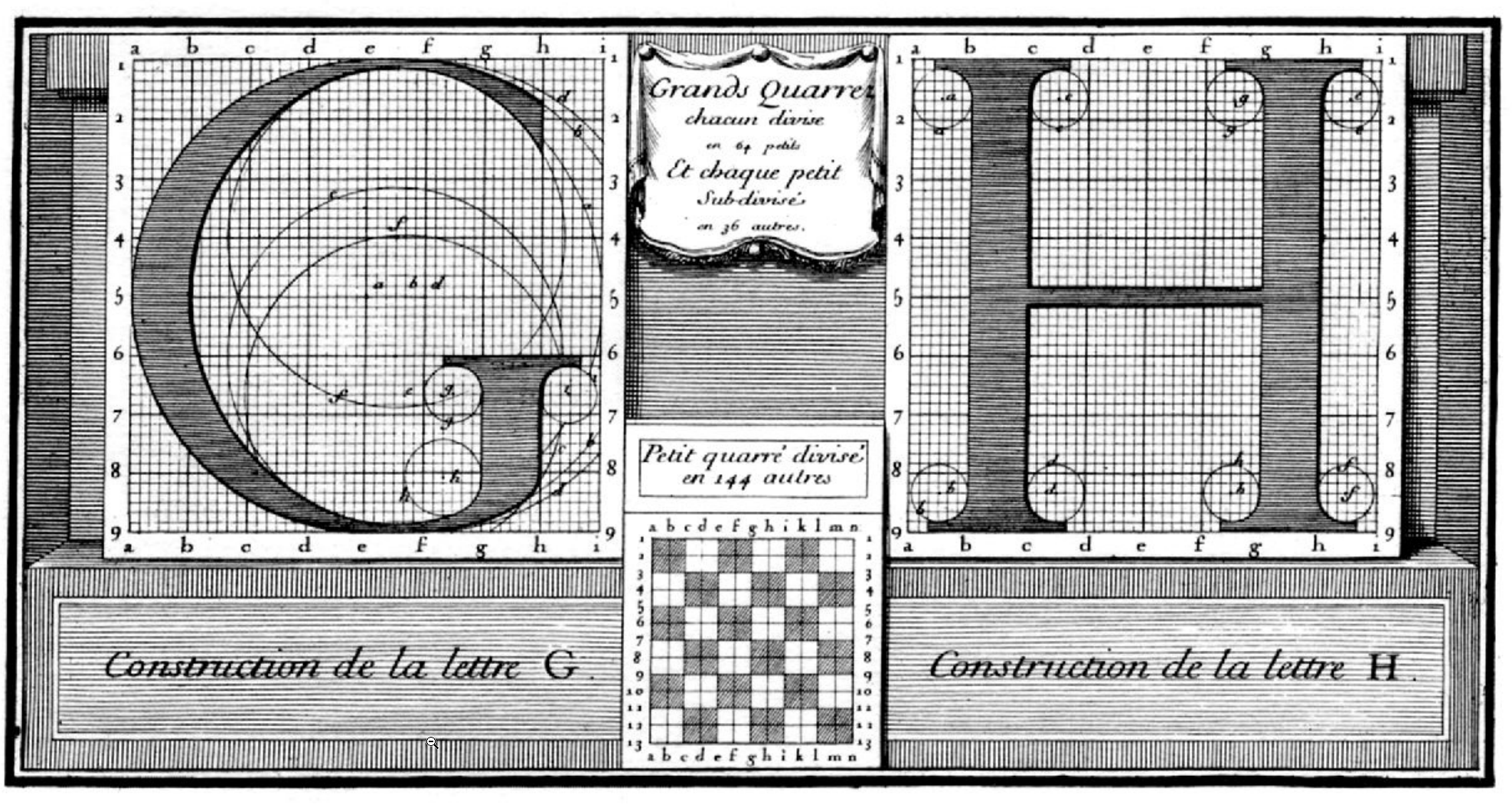
Construction de la lettre G et H

Centuries later, many organizations have followed the Sun King's footsteps. IBM, Airbnb, or Apple have all created their own proprietary typeface. And when you consider that the modern adult now spends about a third of their waking time reading in some way, the investment still feels worth it.

Today, Alan joins the club. And the good news is: anyone can use it, no execution involved.

Why design a custom typeface?

Thankfully, it no longer takes 20 years to design a good typeface, but the process remains long and demanding. Depending on the number of styles and glyphs you want, you could be looking at years of effort. So you really need a good reason to take the plunge.

Most of the time, there are two good reasons.

Form

The first one is of course linked to aesthetic considerations. Can your company’s voice have its unique visual texture? Can the shape of your text carry a deeper meaning and reflect your values? Could you be recognizable only with text? The short answer is yes, with a custom typeface, and enough time to make it stick.

Function

The second reason is more linked to the performance of the typeface as an information carrier. You could be limited by its language covering for example, or by its lack of compatibility with some devices. Readability, accessibility or even technical performance also play a big role (think transportation infrastructures).

In the case of Alan, we had frustrations on both fronts.

In terms of aesthetics, while our previous typeface Filson was perfectly fine, it felt like wearing the same outfit to every occasion. We needed something more playful for marketing purposes, but also capable of showing restraint for product or corporate uses. Filson was in between. Kinda fun, kinda transparent, but not decisively either.

On the technical aspect, our biggest issue was tool compatibility. We spent months perfecting our brand identity. Colors, logos, photography style — everything was dialed in. Then we opened Google Slides or Gmail to find ourselves forced to compromise on Montserrat (a fine typeface, just not the right one). That was frustrating. Filson couldn't live where we worked most.
The process

Small team, strong opinions

Good branding dies in meeting rooms. If you need 100 people to agree on a concept, the concept will end up being average-enough to please everyone. It won’t be bad per se, but it won’t be bold — quite literally in our case.

In line with our culture of “enlightened despotism” (read more about it here), we narrowed the team to just five people: Laure and Tiphaine from the visual team, Anna from brand, Jean-Charles, our CEO, and me, the type design guy!

It was a small number considering the wingspan of the project, but from our perspective, it was small-enough to help us move fast and reach an opinionated result.

What do we want?

As my former teacher Mario Feliciano once said “The trick is not to put as many ideas as you can in a typeface. It is to find the few strong ideas that will lift the rest”.

So we started by a workshop where we just talked ideas. No moodboard, no drawing. Just concepts and keywords. We discussed about the values that we wanted the typeface to carry, where and how we wanted to use it. We also tried to define what we did not want the typeface to be. We settled on the following principles:

  • Edgy but not intimidating: must have something smart and energetic about it, but not be overly intellectual.
  • Friendly but not childish: must be playful, but not to the point where it becomes overbearing.
  • Distinctive: not the typical tech startup "bland" sans serif. We aim for something noticeable and intentional.

We then spent almost a month just exploring concepts.

Font inspiration

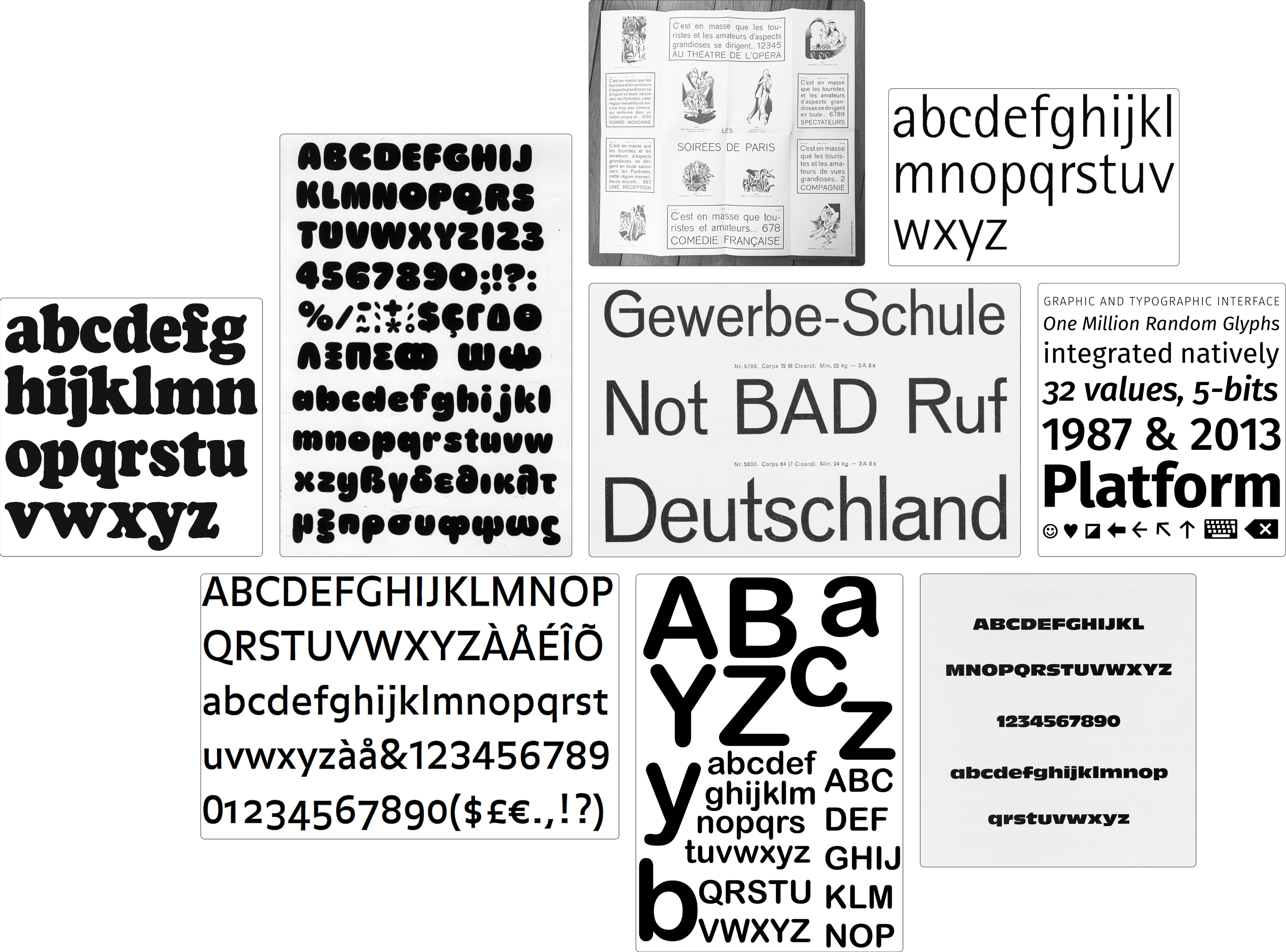
Some early inspirations. In no particular order: Rotis Sans, Antique Olive Nord, Fira Sans, Arial Rounded, Cooper Black, Venus, FF Balance, Peignot Antiques Maigres

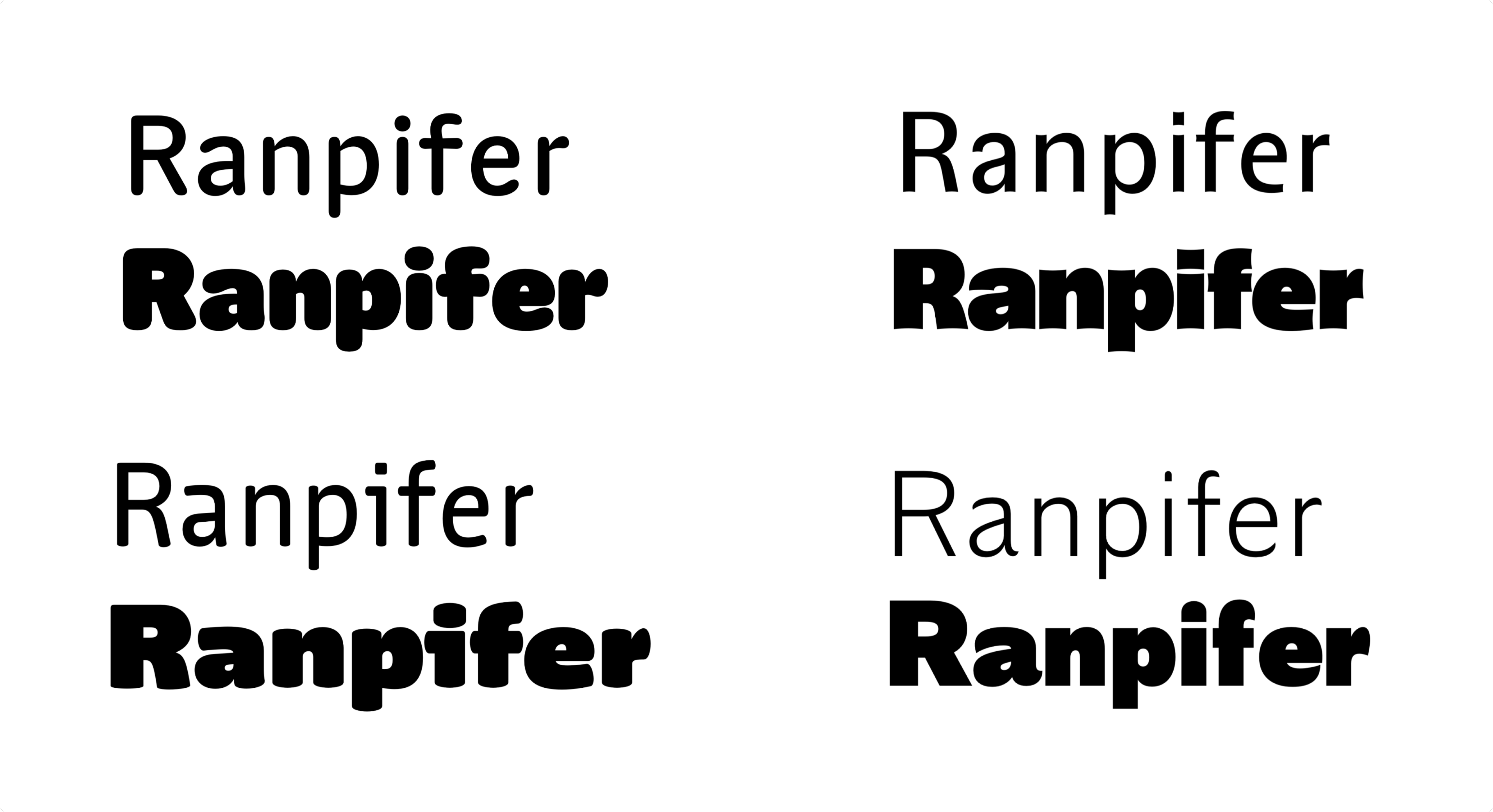
From here, I designed four different concepts that each had a different take on the aforementionned principles. The goal was to find the right balance between “personable” or “opinionated” for example. I didn’t design the full typeface of course, just a few key letters in two weights to get a sense of each vibe.

Different tracks for the font

This tension between solid and soft is probably what proved the trickiest from a design standpoint. Not all letters could be rounded (good luck with an H for example). And those which could didn’t really want to, because they stemmed from a rather mechanical construction.

The track we picked

Best of both worlds?

But we pushed through, because it was precisely what made the project worth it. And after many, many, many tiny discussions, we found our sweet spot.

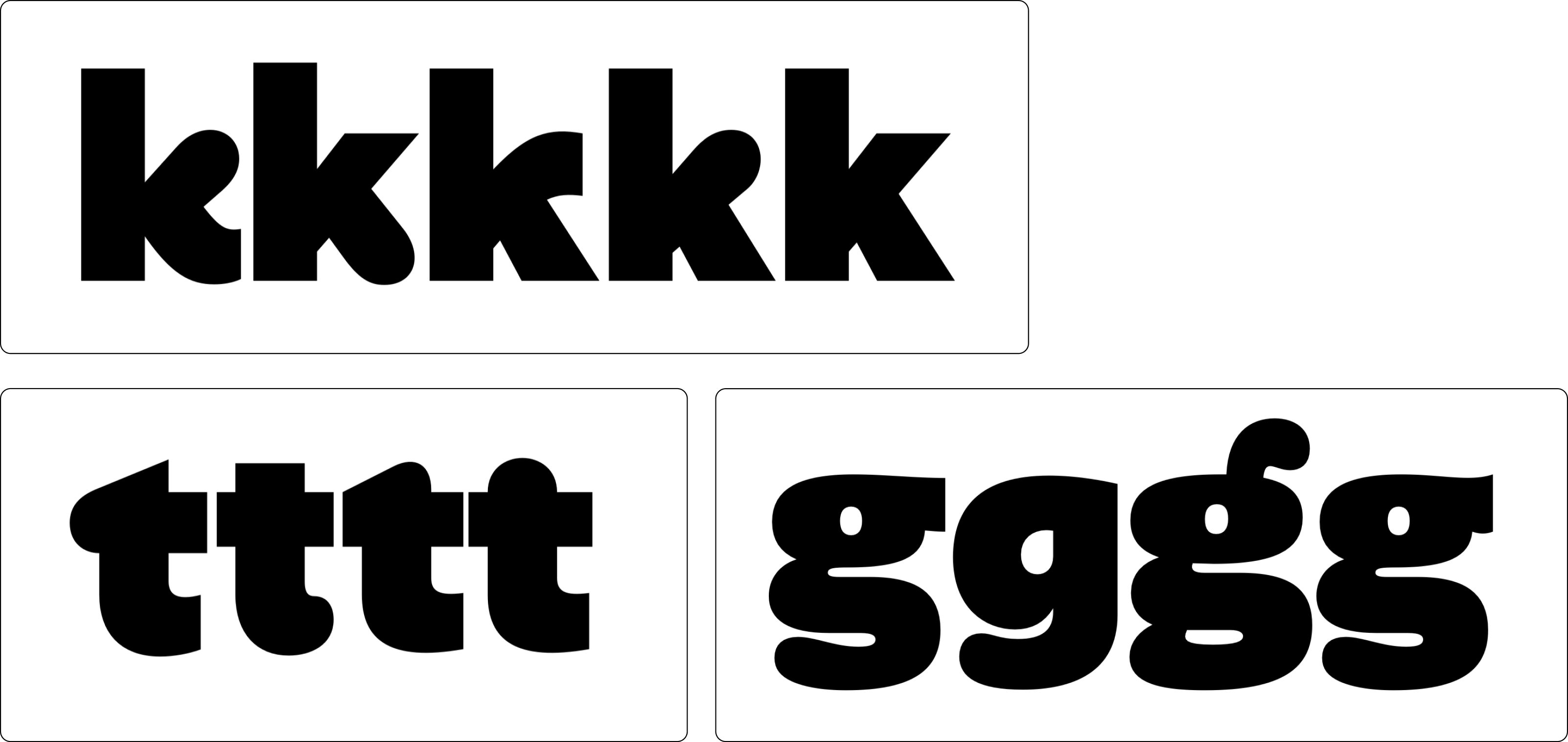
Iterations on k, t & g

And it’s only the tip of the iceberg!

From idea to production

From here onwards, it was about turning those few letters into a fully functioning typeface.

For those without knowledge of the craft, production encompasses three big steps: glyph set extension, spacing, and kerning.

Adding new glyphs

Extending the glyph set is pretty self explanatory. From a single a you derive áăâäàāąåãæ, same thing for capitals, you create the numbers, the language-specific glyphs like ðþßø, you take care of punctuation and special characters like #@&¶§†€¥. And you make sure that all those pieces fit together in terms of proportions, contrast etc.

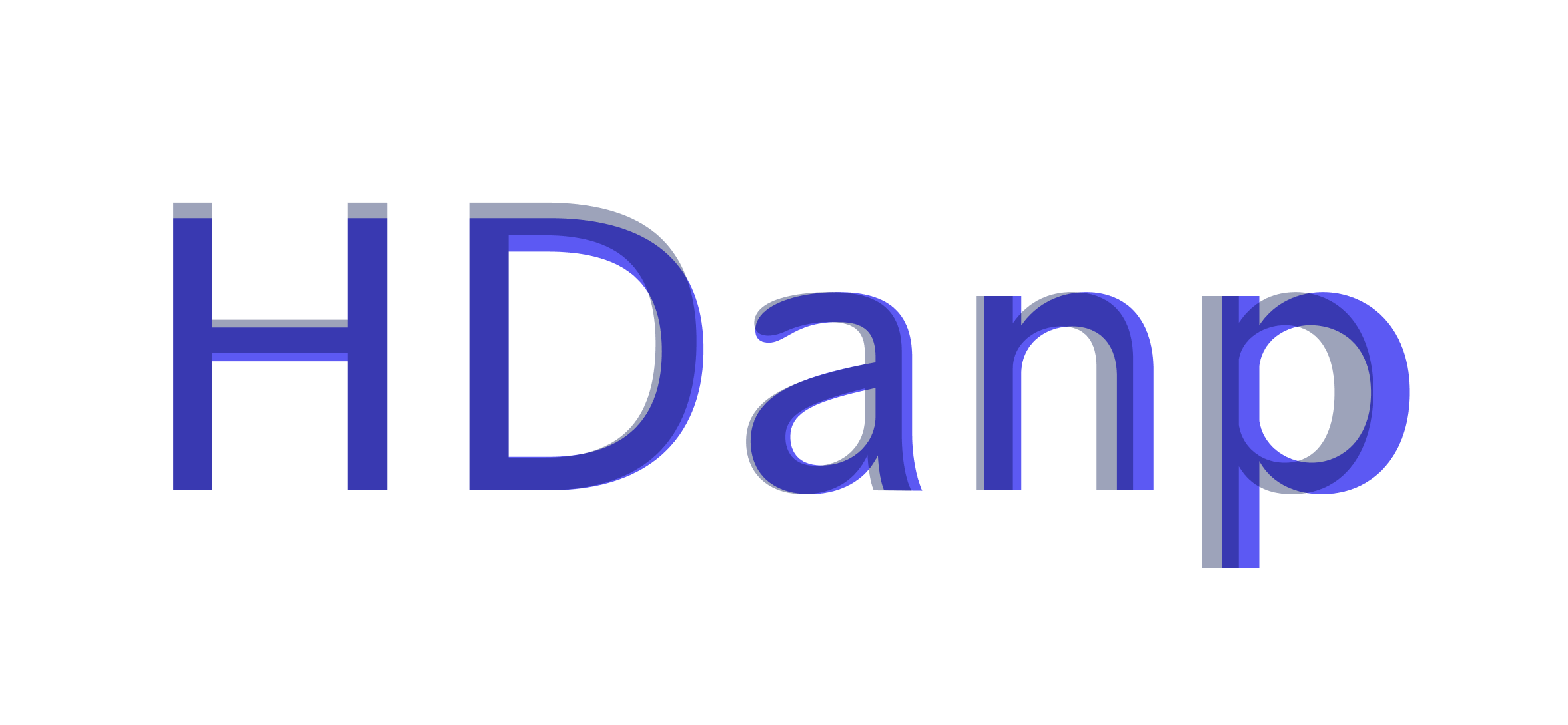
Fun fact on proportions: we almost redesigned the whole typeface twice. The first time to make it a bit larger, the second one to make it a bit shorter. Hats off to Laure for initiating those changes. Those details really increased the legibility at small size.

HDanp

Spacing

Spacing and kerning share the same objective: giving the text a regular, consistent rhythm. But they never happen at the same time.

Spacing is about giving each glyph an optically-consistent white space inside and around them. Squarish, symmetrical letters like HMNnhum are relatively easy to space, but rounded or diagonal ones like KYPvyofdtsr require a bit more love.

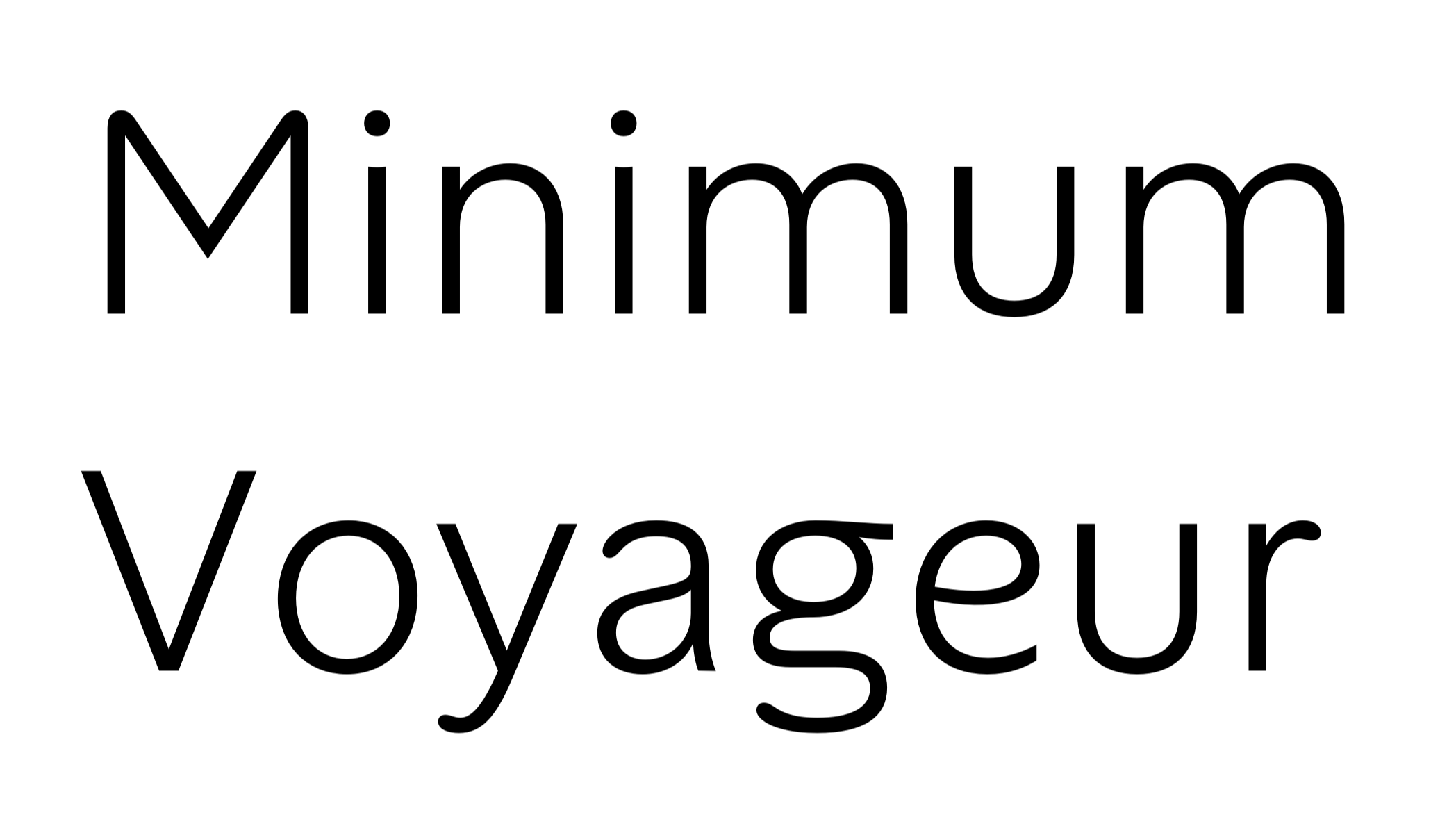
Mimimum voyageur

“Minimum” has roughly same white space between each letters. But when you look at “Voyageur”, some letters look further apart from each others, while others look a bit too tight.

Enter kerning: manual overriding of spacing. This is often done by hand, at the very end of the design. A tedious task that we decided to speed up with the brilliant plugin Kern-on from Tim Ahrens.

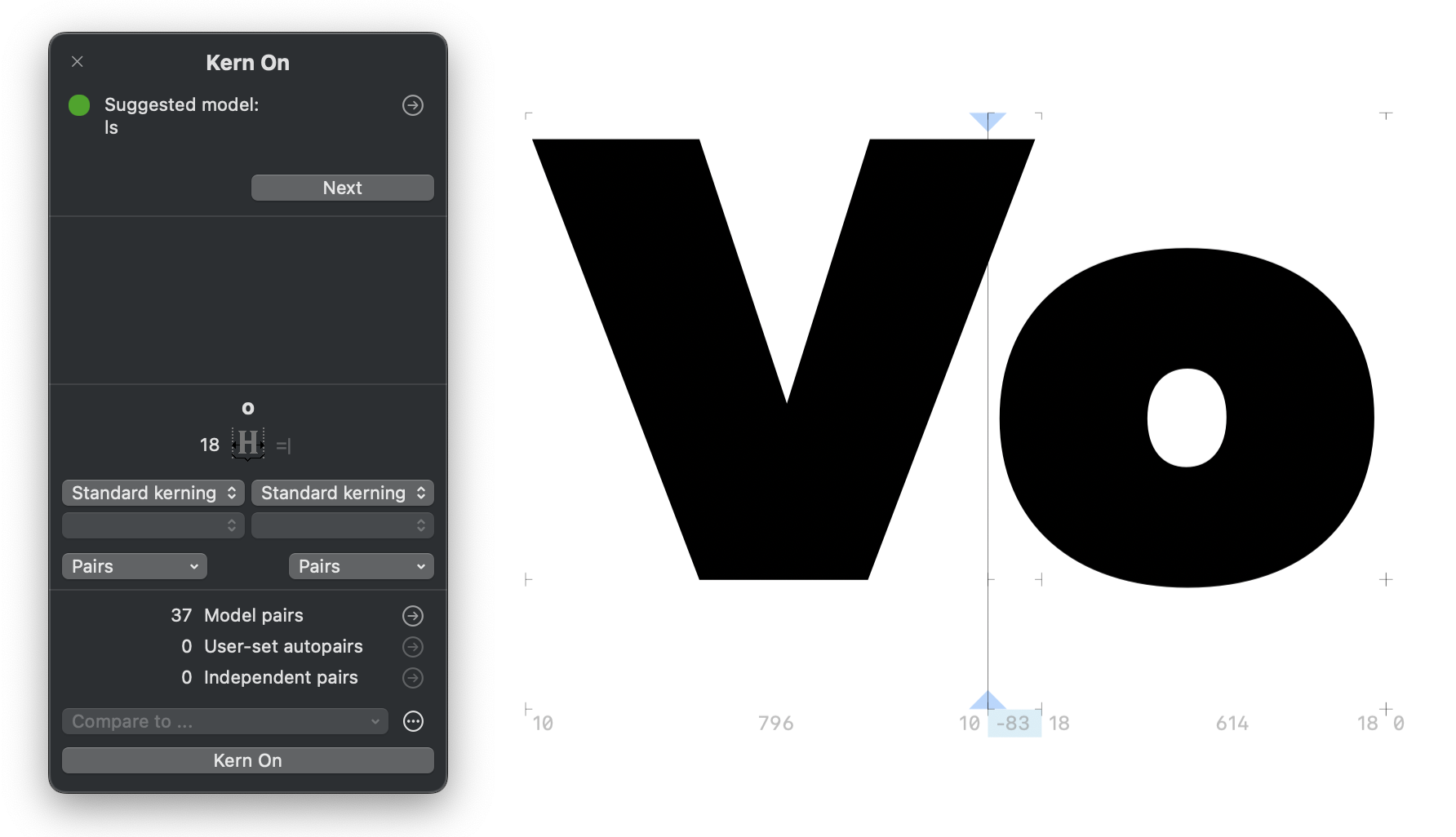
Adjusting kerning

See this little -83 in blue? That’s negative kerning closing the gap.

Refining

This whole production thing is mostly is a solitary job. You spend hours alone just looking at letters. Drawing, spacing, re-drawing, re-spacing... Multiply this by about 500 glyphs and then double it again on two extreme weights (light and black in our case), and you have a great recipe for losing your mind. It’s really easy to “burn your eyes” to the point where you start doubting everything.

Getting help

So when Google Fonts director Dave Crossland offered to staff font engineer Emma Marichal on the project, I wholeheartedly accepted.

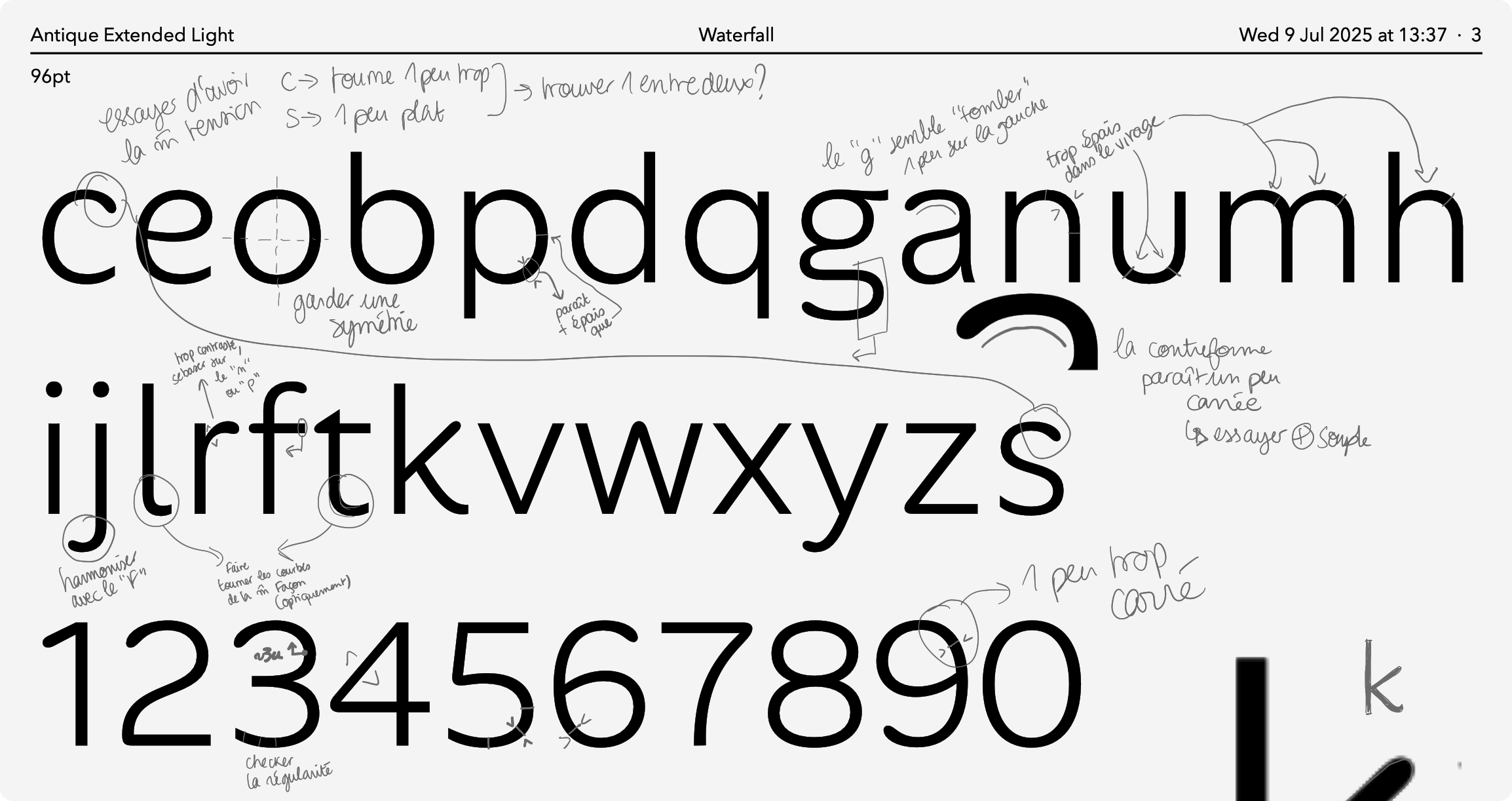
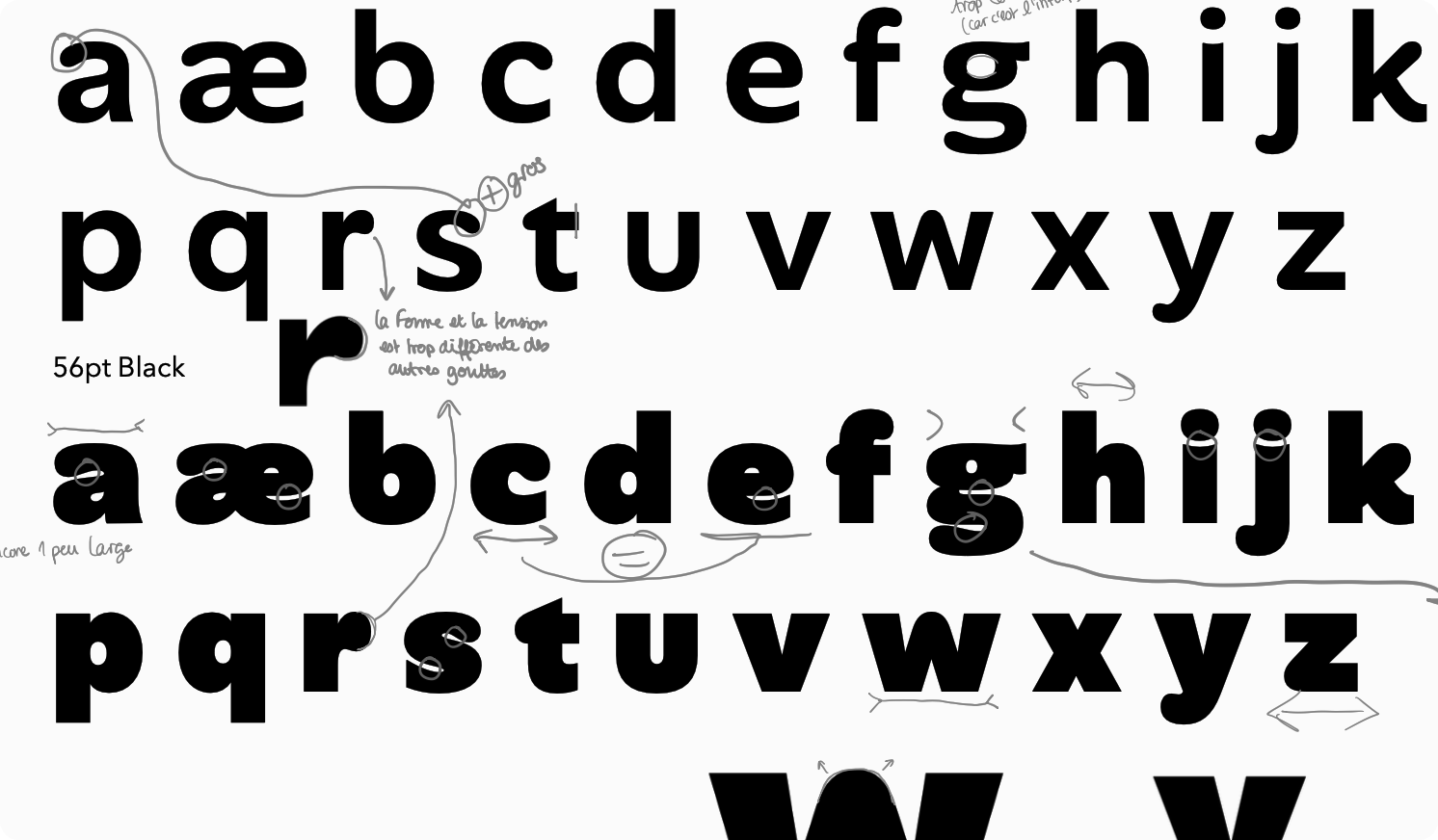
That was the beginning of a quite peculiar correspondence. I would send her PDFs every week or so, and she would wreak havoc in my poor design choices as part of what we typically call the “red pen exercise”.

red pen example
red pen example

And I really, really want to insist on how instrumental her feedback was to the success of the project. With just these small annotations, she took the initial design to the next level, and then the next.

Testing, testing, testing

Printing pages of black and white PDFs only brings you so far. The real test is putting the fonts in their final context: the product, the marketing material... But this is not as easy as you’d think.

First: you need a full typeface, otherwise you’ll end up with big holes in your designs, and that doesn’t look good.

Second: you’ll want to tightly control who gets to test the fonts, because if unfinished prototypes start to spread across the company, it’s a nightmare to clean, trust me.

And third, you need an easy way to update the fonts at each new iteration — without the hassle uninstalling/reinstalling each time.

This is where AI comes to the rescue.

With the help of a tool called Lovable, I built a small specimen website with lots of interactive mockups (app screens, billboard, blog post, website, social ads…) and plugged it to our Github repository to automatically fetch the latest exports of the fonts. It took about four hours in total — which is ridiculously fast when you think about it — but saved us much more in manual updates and maintenance.

With a simple Git push, we could instantly see the changes in context. This was a turning point in realizing that “yes, it works, it’s our typeface”. Even though we didn’t use actual Alan content on the website.

clinic tab
clinic tab
today tab
today tab
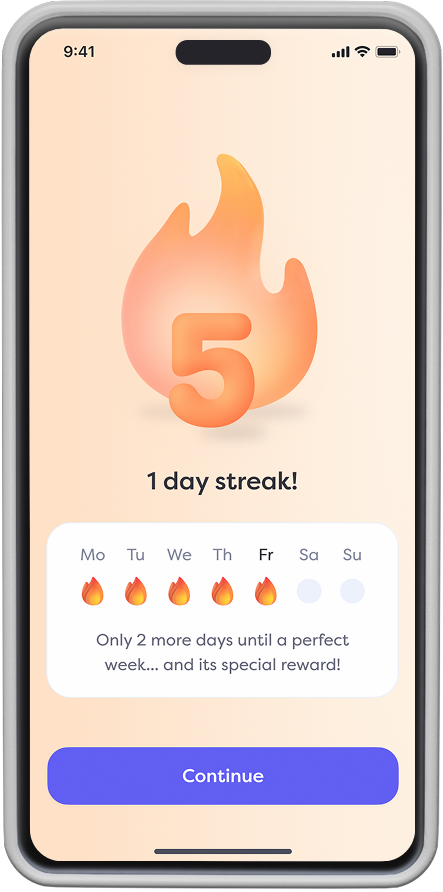
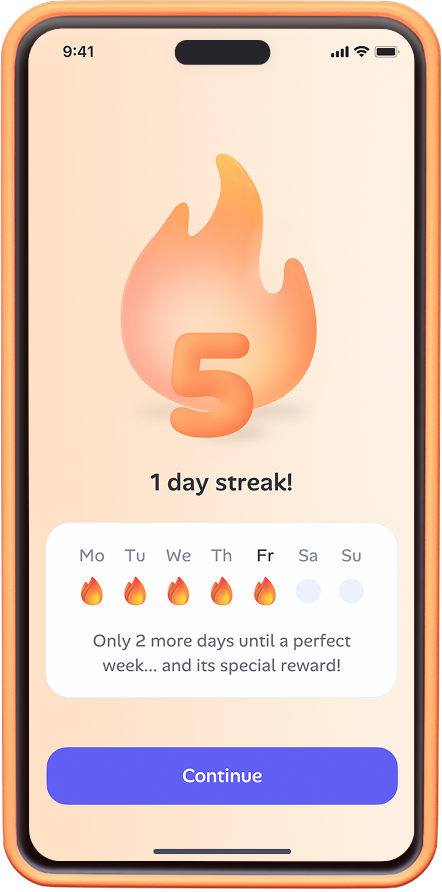
streak screen
streak screen

Before (Filson Pro) and after (Alan Sans)

More testing!

From here, we started to put the typeface through real use cases.

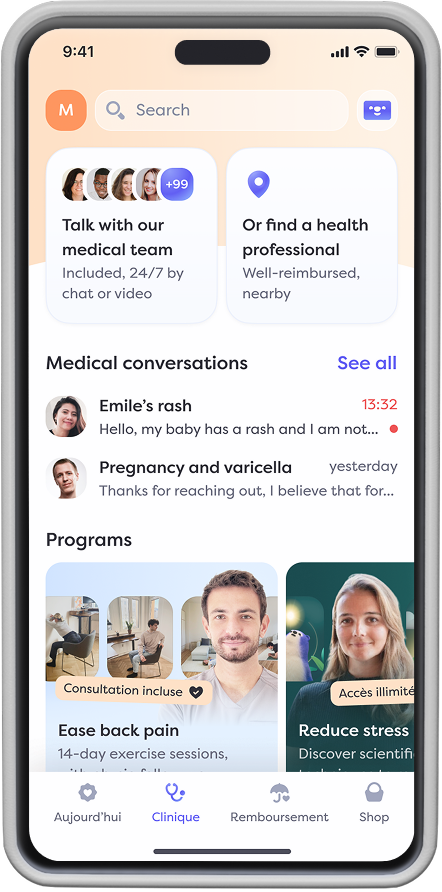
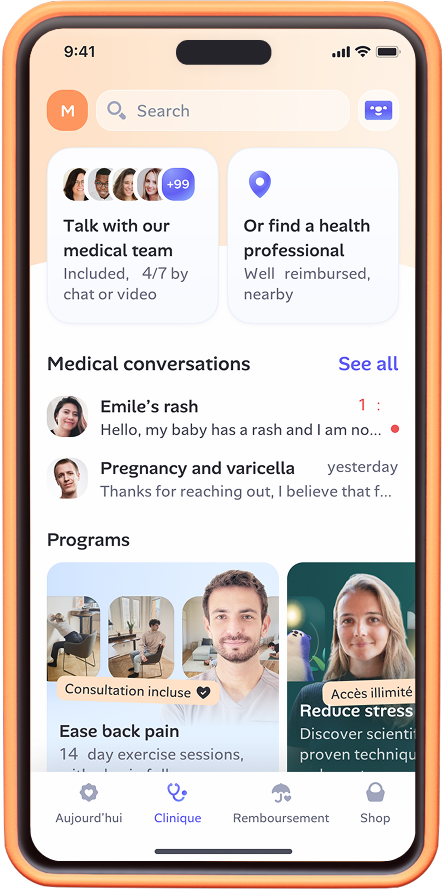
We started with the app. The goal was to ensure nothing would “break” because the typeface behaved too differently from the previous one.

Comparing Filson & Alan Sans

We iterated on spacing, weight… to make sure Alan Sans would fit in Filson’s shoes so to speak. We landed on roughly the same horizontal space occupation, but with the benefit of a looser letterspacing, which slightly improves the readability at small size.

examples in use

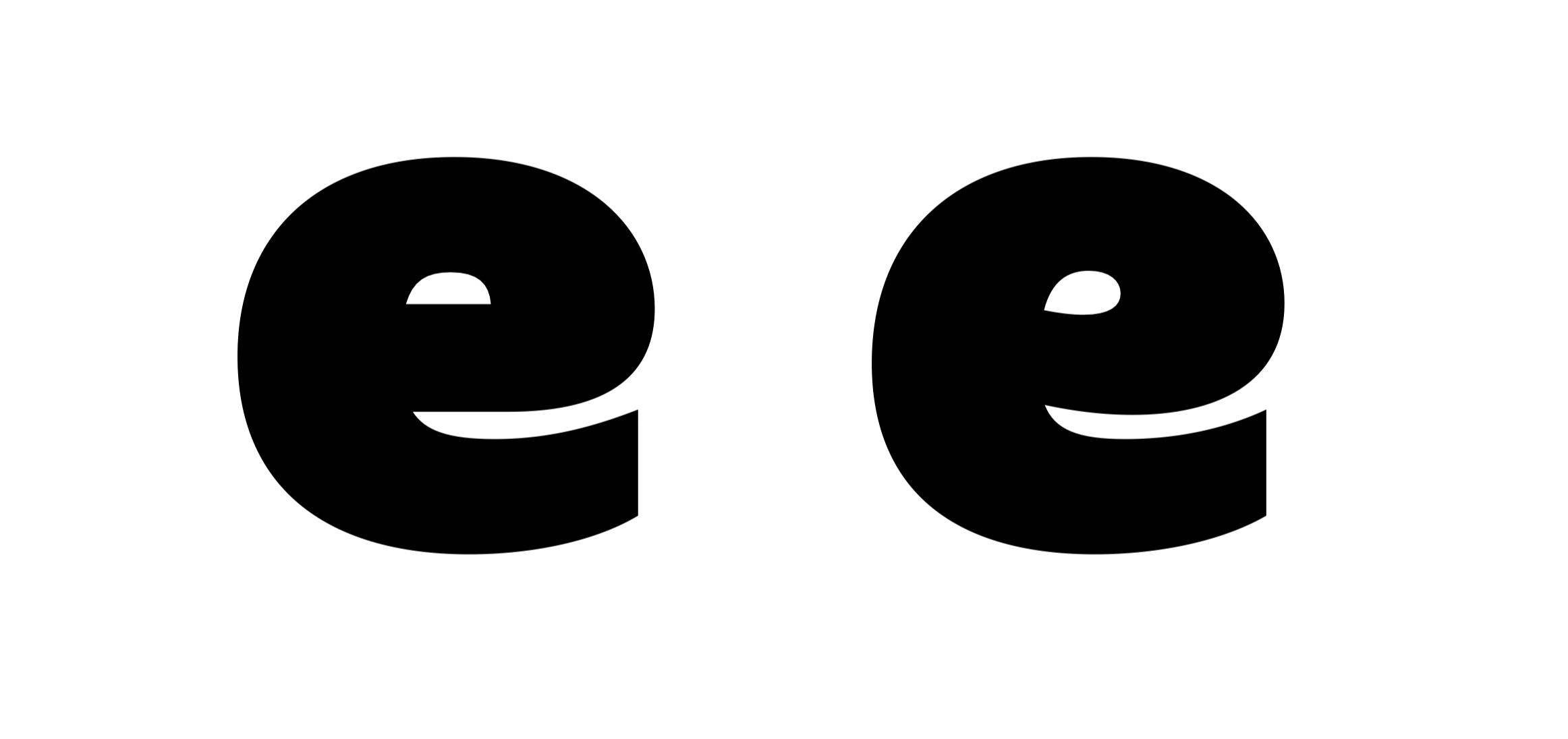
It was then time to test the typeface in more expressive environments — namely: marketing. Here, we looked at how the letter shapes complemented the rest of our visual identity. We didn’t want the typeface to “look like a marmot”. But we didn’t want it to be too contrasting with the rest of our vibe either. It’s at this stage that we decided to change the lowercase e for example.

comparing E

Nah... yeah!

We also made a lot of tests on language. Alan already operates in Spain, Belgium, France, Canada… And this has implications beyond simply adding the Spanish ¿ to the glyph set. Dutch for example has a lot of double vowels (oo, aa, oe...), and this can impact the texture of the text if not properly spaced.

Bringing it all together

One of the greatest feature of computerized font production is you don’t have to design every single weight. You draw the outermost “masters” (thinnest and heaviest), and the machine computes the intermediate weights. But that comes with its share of challenges.

Technical challenges

For the computer to properly draw the Medium between your Light and your Black masters, both have to be designed in a consistent way: same curve tension, same path orientation, same point placement. Otherwise things break.

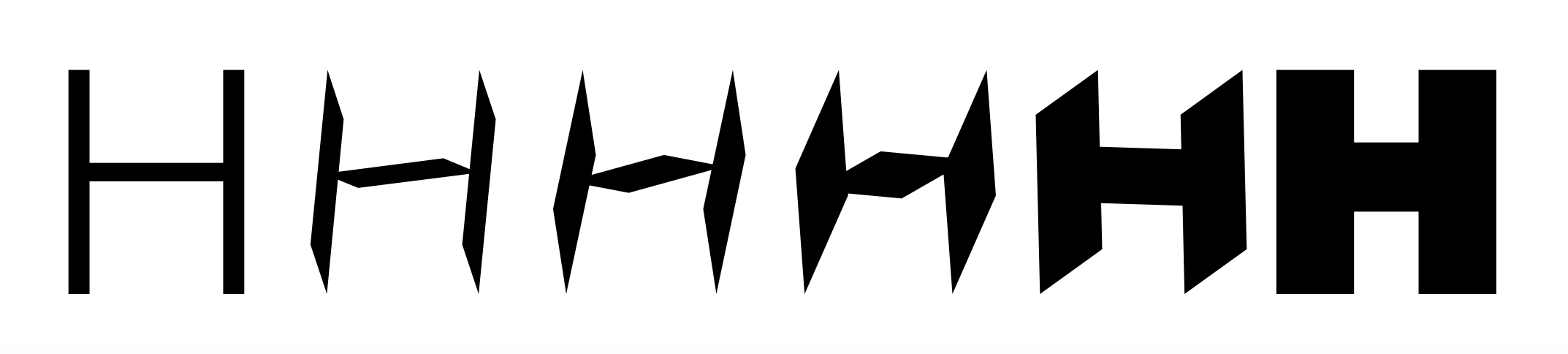
Some errors are very obvious. Like those two H which morph into a sort of Star Wars spacecraft. But others are harder to predict.

Ink traps interpolation

It’s a trap!

Again, nerdy stuff, but in short: it’s not because your extreme masters look the same, that their interpolation will magically work.

Aesthetic challenges

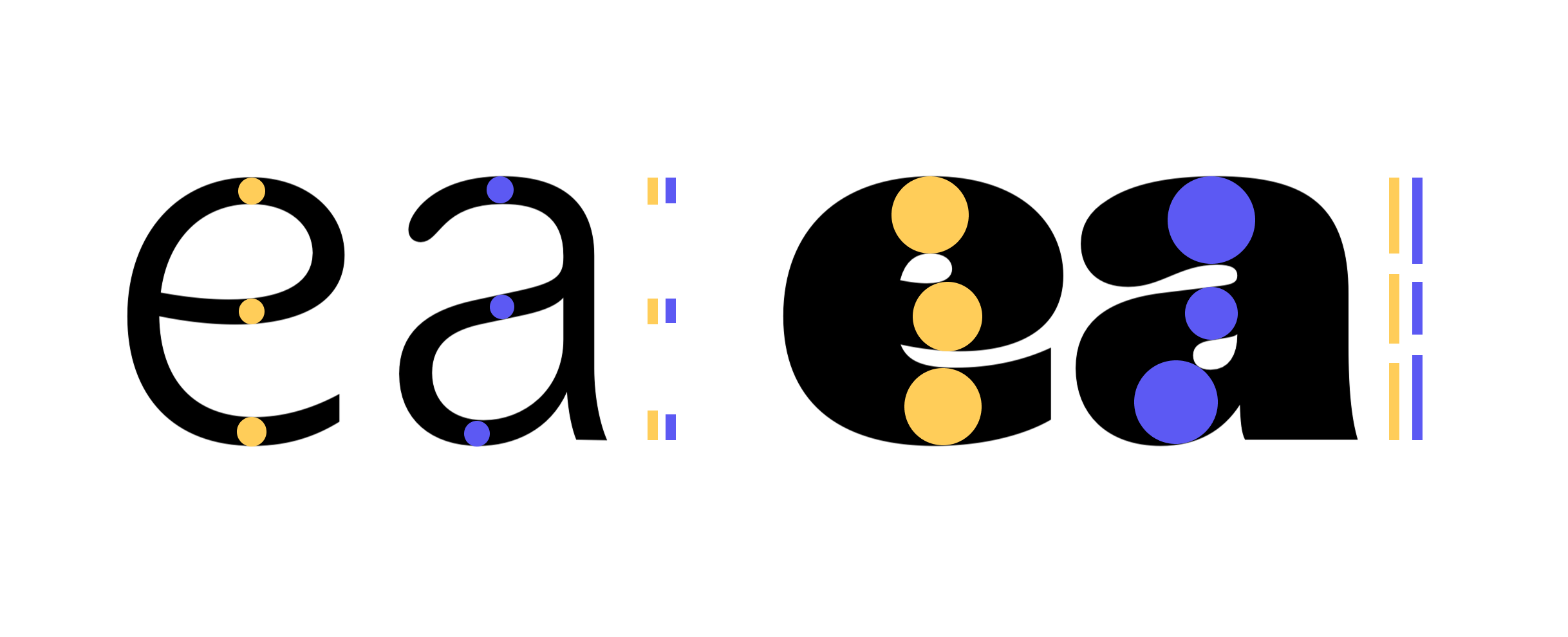
Designing a black and a light rely on almost opposite design philosophies. In the Light master, you pay attention to the black part of the letter because this is where even small weight inconsistencies will become obvious. In the Black, you’re kinda forced to create those inconsistencies because you want to squeeze as much “ink” as possible in the same letter height. So naturally, your horizontal lines become less consistent.

e a

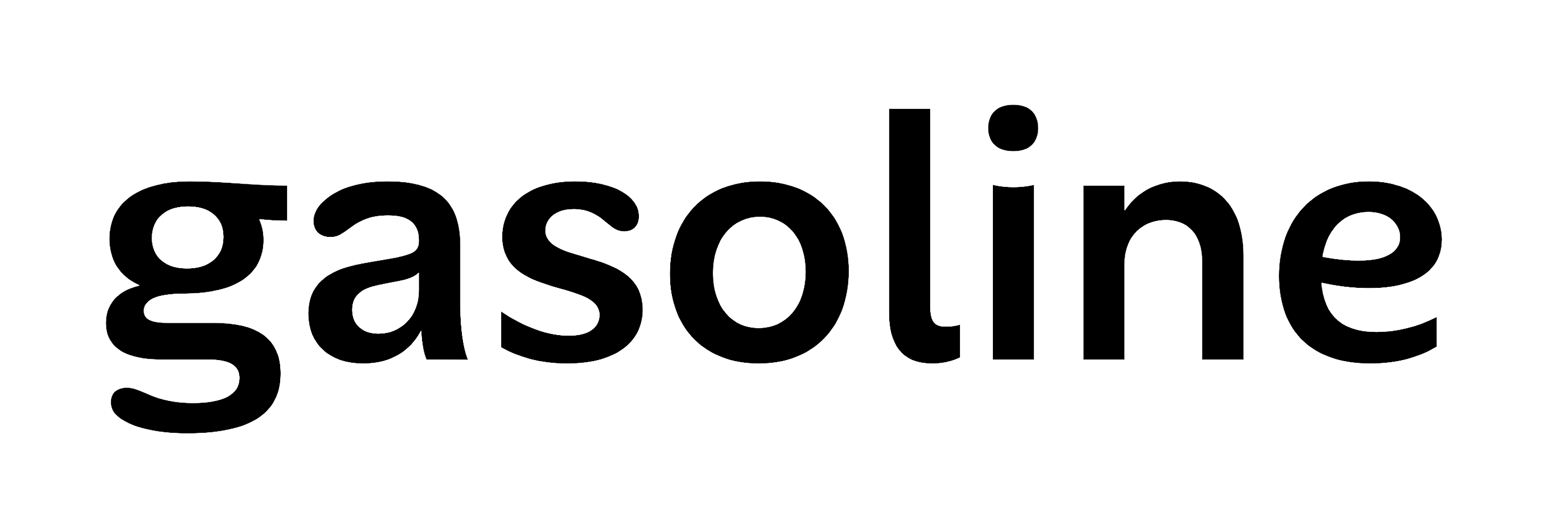
But the consequence of this inevitable tradeoff is that, in the interpolated weights, both philosophies meet halfway. And so the thickness of your strokes will be kinda consistent, but kinda not.

gasoline

Notice how the top and bottom curves of the s and g are thinner than the one on the o .

And so as you refine your design, you almost have to re-draw letters from the Medium weight outwards. You look at the interpolation, and decide which of lighter or bolder master you want to compromise on.

One last thing

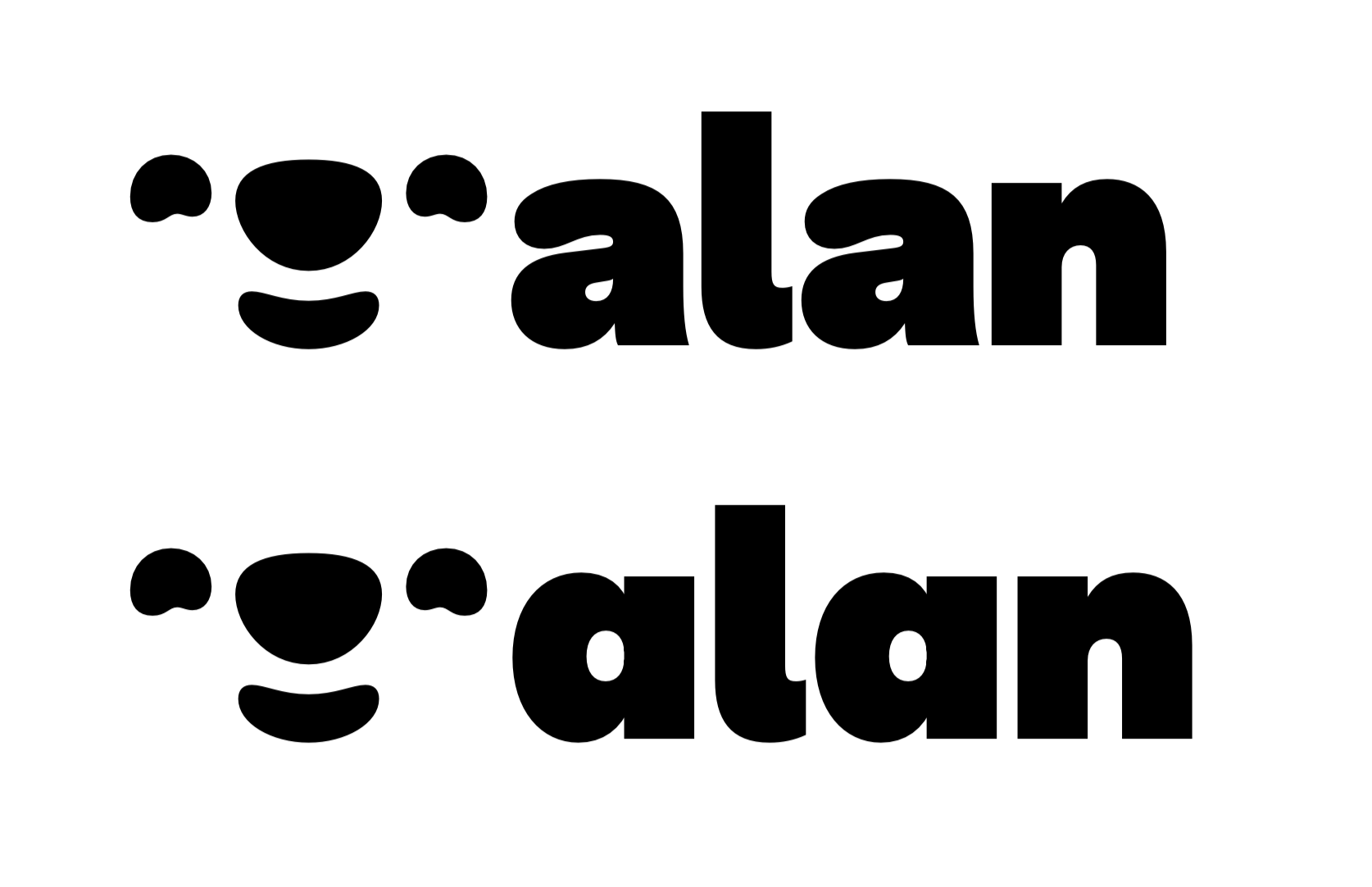
A big debate during the design process was on the type of a we should use as default. I’m a big fan of the classical style (top row in the following visual), but others at Alan felt we should go for the simpler, monocular version — which also happens to be the one we use in our logo.

alan logo with the new font

This little marmot is also a hidden glyph!

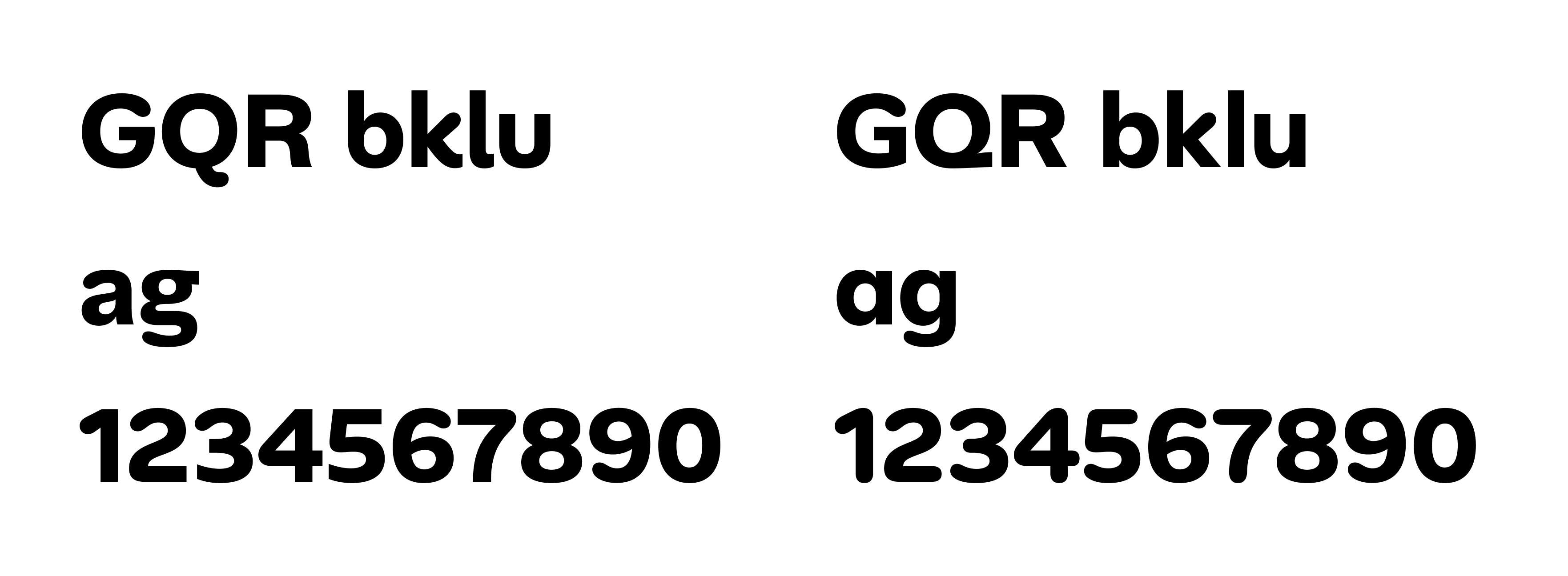
Lucky for us, you don’t really have to make that choice. Modern font technology allows to embed multiple variants of a given letter in a typeface — what we call “Alternates”. And of course we designed a ton of them. They might seem like minor changes, but they can totally transform the flavor of the text.

Alternates

And there you have it!

Five months and 497 glyphs later, Alan Sans is out in the world. Our brand identity finally goes everywhere we do. Internal docs, external communications, product interfaces, it all speaks with one voice now.

But it’s also our gift to the design community and those who seek personality without sacrificing function. A voice that could be serious in a boardroom and friendly in a blog post, like this one.

Discover the font

Download the font

Join our team

Product designer role

arrow

September 24, 2025

How we created Alan Sans

Raphaël Ronot

Product & Type Designer @ Alan

Alan’s voice was always special, so we gave it a unique shape. Here’s how.

Did you know the first custom typeface was French?

In 1694, Louis XIV (of course it was him) commissioned the "Romain du Roi" as part of his agenda to establish France's dominance in arts and science. It took about 20 years to complete, and quickly became a staple of the King's visual language — so much so that using it without His Majesty's approval was punishable by death.

Construction de la lettre G et H

Centuries later, many organizations have followed the Sun King's footsteps. IBM, Airbnb, or Apple have all created their own proprietary typeface. And when you consider that the modern adult now spends about a third of their waking time reading in some way, the investment still feels worth it.

Today, Alan joins the club. And the good news is: anyone can use it, no execution involved.

Why design a custom typeface?

Thankfully, it no longer takes 20 years to design a good typeface, but the process remains long and demanding. Depending on the number of styles and glyphs you want, you could be looking at years of effort. So you really need a good reason to take the plunge.

Most of the time, there are two good reasons.

Form

The first one is of course linked to aesthetic considerations. Can your company’s voice have its unique visual texture? Can the shape of your text carry a deeper meaning and reflect your values? Could you be recognizable only with text? The short answer is yes, with a custom typeface, and enough time to make it stick.

Function

The second reason is more linked to the performance of the typeface as an information carrier. You could be limited by its language covering for example, or by its lack of compatibility with some devices. Readability, accessibility or even technical performance also play a big role (think transportation infrastructures).

In the case of Alan, we had frustrations on both fronts.

In terms of aesthetics, while our previous typeface Filson was perfectly fine, it felt like wearing the same outfit to every occasion. We needed something more playful for marketing purposes, but also capable of showing restraint for product or corporate uses. Filson was in between. Kinda fun, kinda transparent, but not decisively either.

On the technical aspect, our biggest issue was tool compatibility. We spent months perfecting our brand identity. Colors, logos, photography style — everything was dialed in. Then we opened Google Slides or Gmail to find ourselves forced to compromise on Montserrat (a fine typeface, just not the right one). That was frustrating. Filson couldn't live where we worked most.
The process

Small team, strong opinions

Good branding dies in meeting rooms. If you need 100 people to agree on a concept, the concept will end up being average-enough to please everyone. It won’t be bad per se, but it won’t be bold — quite literally in our case.

In line with our culture of “enlightened despotism” (read more about it here), we narrowed the team to just five people: Laure and Tiphaine from the visual team, Anna from brand, Jean-Charles, our CEO, and me, the type design guy!

It was a small number considering the wingspan of the project, but from our perspective, it was small-enough to help us move fast and reach an opinionated result.

What do we want?

As my former teacher Mario Feliciano once said “The trick is not to put as many ideas as you can in a typeface. It is to find the few strong ideas that will lift the rest”.

So we started by a workshop where we just talked ideas. No moodboard, no drawing. Just concepts and keywords. We discussed about the values that we wanted the typeface to carry, where and how we wanted to use it. We also tried to define what we did not want the typeface to be. We settled on the following principles:

  • Edgy but not intimidating: must have something smart and energetic about it, but not be overly intellectual.
  • Friendly but not childish: must be playful, but not to the point where it becomes overbearing.
  • Distinctive: not the typical tech startup "bland" sans serif. We aim for something noticeable and intentional.

We then spent almost a month just exploring concepts.

Font inspiration

Some early inspirations. In no particular order: Rotis Sans, Antique Olive Nord, Fira Sans, Arial Rounded, Cooper Black, Venus, FF Balance, Peignot Antiques Maigres

From here, I designed four different concepts that each had a different take on the aforementionned principles. The goal was to find the right balance between “personable” or “opinionated” for example. I didn’t design the full typeface of course, just a few key letters in two weights to get a sense of each vibe.

Different tracks for the font

This tension between solid and soft is probably what proved the trickiest from a design standpoint. Not all letters could be rounded (good luck with an H for example). And those which could didn’t really want to, because they stemmed from a rather mechanical construction.

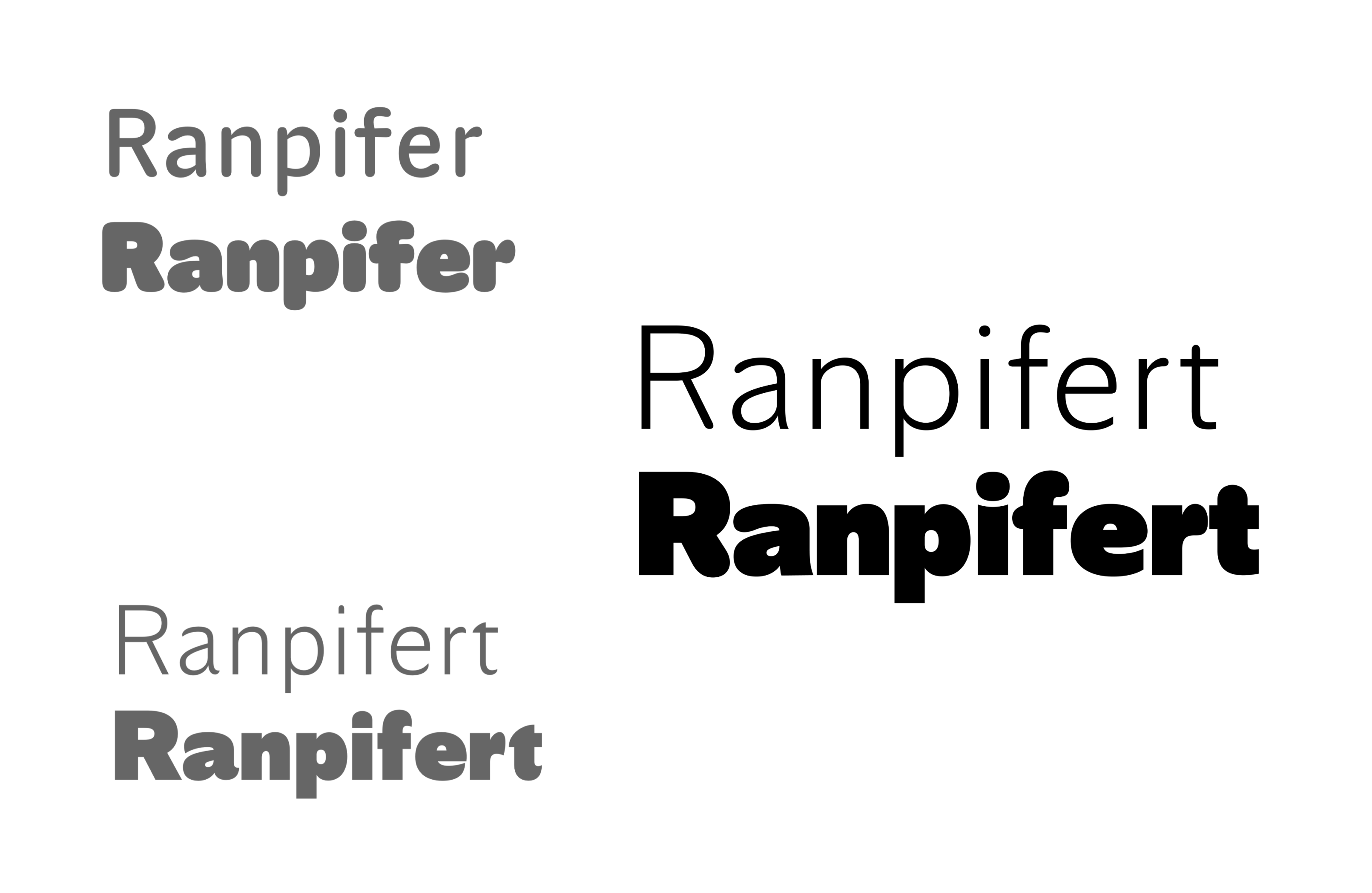
The track we picked

Best of both worlds?

But we pushed through, because it was precisely what made the project worth it. And after many, many, many tiny discussions, we found our sweet spot.

Iterations on k, t & g

And it’s only the tip of the iceberg!

From idea to production

From here onwards, it was about turning those few letters into a fully functioning typeface.

For those without knowledge of the craft, production encompasses three big steps: glyph set extension, spacing, and kerning.

Adding new glyphs

Extending the glyph set is pretty self explanatory. From a single a you derive áăâäàāąåãæ, same thing for capitals, you create the numbers, the language-specific glyphs like ðþßø, you take care of punctuation and special characters like #@&¶§†€¥. And you make sure that all those pieces fit together in terms of proportions, contrast etc.

Fun fact on proportions: we almost redesigned the whole typeface twice. The first time to make it a bit larger, the second one to make it a bit shorter. Hats off to Laure for initiating those changes. Those details really increased the legibility at small size.

HDanp

Spacing

Spacing and kerning share the same objective: giving the text a regular, consistent rhythm. But they never happen at the same time.

Spacing is about giving each glyph an optically-consistent white space inside and around them. Squarish, symmetrical letters like HMNnhum are relatively easy to space, but rounded or diagonal ones like KYPvyofdtsr require a bit more love.

Mimimum voyageur

“Minimum” has roughly same white space between each letters. But when you look at “Voyageur”, some letters look further apart from each others, while others look a bit too tight.

Enter kerning: manual overriding of spacing. This is often done by hand, at the very end of the design. A tedious task that we decided to speed up with the brilliant plugin Kern-on from Tim Ahrens.

Adjusting kerning

See this little -83 in blue? That’s negative kerning closing the gap.

Refining

This whole production thing is mostly is a solitary job. You spend hours alone just looking at letters. Drawing, spacing, re-drawing, re-spacing... Multiply this by about 500 glyphs and then double it again on two extreme weights (light and black in our case), and you have a great recipe for losing your mind. It’s really easy to “burn your eyes” to the point where you start doubting everything.

Getting help

So when Google Fonts director Dave Crossland offered to staff font engineer Emma Marichal on the project, I wholeheartedly accepted.

That was the beginning of a quite peculiar correspondence. I would send her PDFs every week or so, and she would wreak havoc in my poor design choices as part of what we typically call the “red pen exercise”.

red pen example
red pen example

And I really, really want to insist on how instrumental her feedback was to the success of the project. With just these small annotations, she took the initial design to the next level, and then the next.

Testing, testing, testing

Printing pages of black and white PDFs only brings you so far. The real test is putting the fonts in their final context: the product, the marketing material... But this is not as easy as you’d think.

First: you need a full typeface, otherwise you’ll end up with big holes in your designs, and that doesn’t look good.

Second: you’ll want to tightly control who gets to test the fonts, because if unfinished prototypes start to spread across the company, it’s a nightmare to clean, trust me.

And third, you need an easy way to update the fonts at each new iteration — without the hassle uninstalling/reinstalling each time.

This is where AI comes to the rescue.

With the help of a tool called Lovable, I built a small specimen website with lots of interactive mockups (app screens, billboard, blog post, website, social ads…) and plugged it to our Github repository to automatically fetch the latest exports of the fonts. It took about four hours in total — which is ridiculously fast when you think about it — but saved us much more in manual updates and maintenance.

With a simple Git push, we could instantly see the changes in context. This was a turning point in realizing that “yes, it works, it’s our typeface”. Even though we didn’t use actual Alan content on the website.

clinic tab
clinic tab
today tab
today tab
streak screen
streak screen

Before (Filson Pro) and after (Alan Sans)

More testing!

From here, we started to put the typeface through real use cases.

We started with the app. The goal was to ensure nothing would “break” because the typeface behaved too differently from the previous one.

Comparing Filson & Alan Sans

We iterated on spacing, weight… to make sure Alan Sans would fit in Filson’s shoes so to speak. We landed on roughly the same horizontal space occupation, but with the benefit of a looser letterspacing, which slightly improves the readability at small size.

examples in use

It was then time to test the typeface in more expressive environments — namely: marketing. Here, we looked at how the letter shapes complemented the rest of our visual identity. We didn’t want the typeface to “look like a marmot”. But we didn’t want it to be too contrasting with the rest of our vibe either. It’s at this stage that we decided to change the lowercase e for example.

comparing E

Nah... yeah!

We also made a lot of tests on language. Alan already operates in Spain, Belgium, France, Canada… And this has implications beyond simply adding the Spanish ¿ to the glyph set. Dutch for example has a lot of double vowels (oo, aa, oe...), and this can impact the texture of the text if not properly spaced.

Bringing it all together

One of the greatest feature of computerized font production is you don’t have to design every single weight. You draw the outermost “masters” (thinnest and heaviest), and the machine computes the intermediate weights. But that comes with its share of challenges.

Technical challenges

For the computer to properly draw the Medium between your Light and your Black masters, both have to be designed in a consistent way: same curve tension, same path orientation, same point placement. Otherwise things break.

Some errors are very obvious. Like those two H which morph into a sort of Star Wars spacecraft. But others are harder to predict.

Ink traps interpolation

It’s a trap!

Again, nerdy stuff, but in short: it’s not because your extreme masters look the same, that their interpolation will magically work.

Aesthetic challenges

Designing a black and a light rely on almost opposite design philosophies. In the Light master, you pay attention to the black part of the letter because this is where even small weight inconsistencies will become obvious. In the Black, you’re kinda forced to create those inconsistencies because you want to squeeze as much “ink” as possible in the same letter height. So naturally, your horizontal lines become less consistent.

e a

But the consequence of this inevitable tradeoff is that, in the interpolated weights, both philosophies meet halfway. And so the thickness of your strokes will be kinda consistent, but kinda not.

gasoline

Notice how the top and bottom curves of the s and g are thinner than the one on the o .

And so as you refine your design, you almost have to re-draw letters from the Medium weight outwards. You look at the interpolation, and decide which of lighter or bolder master you want to compromise on.

One last thing

A big debate during the design process was on the type of a we should use as default. I’m a big fan of the classical style (top row in the following visual), but others at Alan felt we should go for the simpler, monocular version — which also happens to be the one we use in our logo.

alan logo with the new font

This little marmot is also a hidden glyph!

Lucky for us, you don’t really have to make that choice. Modern font technology allows to embed multiple variants of a given letter in a typeface — what we call “Alternates”. And of course we designed a ton of them. They might seem like minor changes, but they can totally transform the flavor of the text.

Alternates

And there you have it!

Five months and 497 glyphs later, Alan Sans is out in the world. Our brand identity finally goes everywhere we do. Internal docs, external communications, product interfaces, it all speaks with one voice now.

But it’s also our gift to the design community and those who seek personality without sacrificing function. A voice that could be serious in a boardroom and friendly in a blog post, like this one.

Discover the font

Download the font

Join our team